Amplitude
The Amplitude integration automatically sends Superwall subscription and payment events to your Amplitude project. Track subscription lifecycle events, analyze revenue metrics, and understand user behavior with automatic event mapping and revenue tracking.
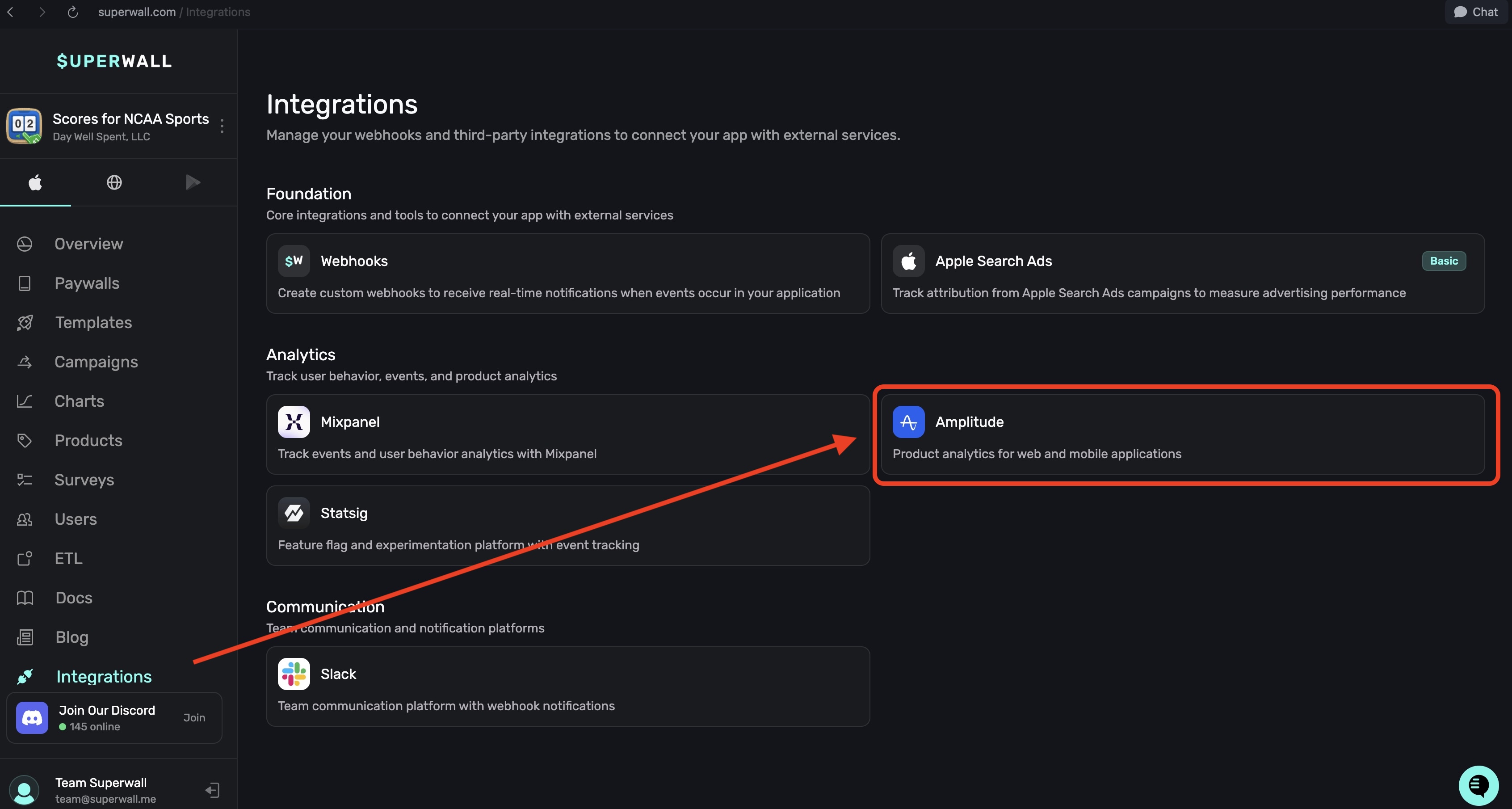
In the Analytics section within Integrations, you can connect your Amplitude account to Superwall:
Required fields
Fill out the following fields and click the Enable Amplitude button at the bottom right to save your changes:
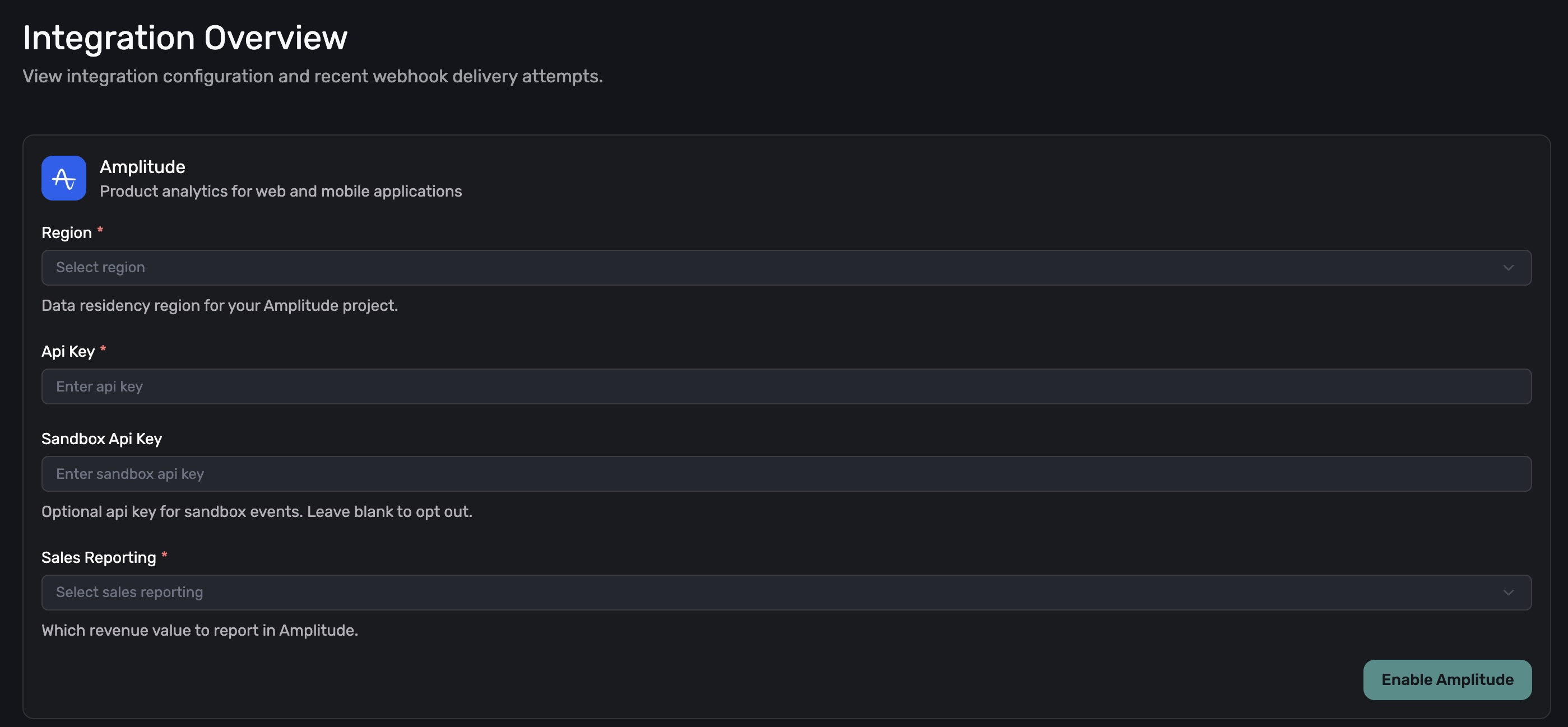
- Region: Data residency region for your Amplitude project.
- Api Key: Your Amplitude API key.
- Sandbox Api Key: Optional API key for sandbox events (leave blank to opt out).
- Sales Reporting: Which revenue value to report in Amplitude. Choose between Proceeds (after store taxes & fees) or Revenue.
Features
- Automatic Event Mapping: Converts Superwall events to Amplitude-friendly format
- Revenue Tracking: Automatic revenue attribution with LTV tracking
- Multi-Region Support: Works with US and EU data residency
- Sandbox Isolation: Separate tracking for production and sandbox events
- Human-Readable Events: Events prefixed with
[Superwall]for easy identification - Session Tracking: Automatic session ID generation
- Platform Attribution: Tracks which store (App Store, Play Store, Stripe) generated revenue
Configuration
Required settings
| Field | Description | Example |
|---|---|---|
integration_id | Must be set to "amplitude" | "amplitude" |
region | Data residency region | "US (Default)" or "EU" |
api_key | Your Amplitude API key | "abc123def456..." |
sales_reporting | Which value to report | "Revenue" or "Proceeds" |
Optional settings
| Field | Description | Example |
|---|---|---|
sandbox_api_key | API key for sandbox events (leave blank to skip) | "xyz789..." |
Example configuration
{
  "integration_id": "amplitude",
  "region": "US (Default)",
  "api_key": "your_production_api_key_here",
  "sandbox_api_key": "your_sandbox_api_key_here",
  "sales_reporting": "Revenue"
}
Event mapping
Superwall events are transformed into readable, Title Case Amplitude events.
Event name format
All events are prefixed with [Superwall] followed by the Title Case name:
- Example:
[Superwall] Trial Start - Example:
[Superwall] Renewal
Each event also has a stable sw_* identifier. The identifier is internal and not what Amplitude receives — the value in the Amplitude Event column is what arrives in your project.
These names are not configurable. There is no per-customer event renaming for Amplitude; every project on this integration receives the same Title Case names.
Trial events
| Superwall Event | Amplitude Event | Identifier | Description |
|---|---|---|---|
initial_purchase + TRIAL | [Superwall] Trial Start | sw_trial_start | Trial begins |
cancellation + TRIAL | [Superwall] Trial Cancelled | sw_trial_cancelled | Trial cancelled |
uncancellation + TRIAL | [Superwall] Trial Uncancelled | sw_trial_uncancelled | Trial reactivated |
expiration + TRIAL | [Superwall] Trial Expired | sw_trial_expired | Trial ended |
renewal + isTrialConversion: true | [Superwall] Trial Converted | sw_trial_converted | Trial converts to paid |
Intro offer events
| Superwall Event | Amplitude Event | Identifier | Description |
|---|---|---|---|
initial_purchase + INTRO | [Superwall] Intro Offer Start | sw_intro_offer_start | Intro offer begins |
cancellation + INTRO | [Superwall] Intro Offer Cancelled | sw_intro_offer_cancelled | Intro offer cancelled |
uncancellation + INTRO | [Superwall] Intro Offer Uncancelled | sw_intro_offer_uncancelled | Intro offer reactivated |
expiration + INTRO | [Superwall] Intro Offer Expired | sw_intro_offer_expired | Intro offer ended |
renewal + INTRO | [Superwall] Intro Offer Converted | sw_intro_offer_converted | Intro converts to regular |
Subscription events
| Superwall Event | Amplitude Event | Identifier | Description |
|---|---|---|---|
initial_purchase + NORMAL | [Superwall] Subscription Start | sw_subscription_start | Paid subscription begins |
renewal + NORMAL | [Superwall] Renewal | sw_renewal | Regular renewal |
cancellation + NORMAL | [Superwall] Subscription Cancelled | sw_subscription_cancelled | Subscription cancelled |
uncancellation + NORMAL | [Superwall] Subscription Uncancelled | sw_subscription_uncancelled | Subscription reactivated |
expiration + NORMAL | [Superwall] Subscription Expired | sw_subscription_expired | Subscription ended |
Other events
Matched on the event name alone, before periodType is consulted:
| Superwall Event | Amplitude Event | Identifier | Description |
|---|---|---|---|
test | [Superwall] Test Event | sw_test | Test event |
product_change | [Superwall] Product Change | sw_product_change | Plan changed |
subscription_paused | [Superwall] Subscription Paused | sw_subscription_paused | Subscription paused |
non_renewing_purchase | [Superwall] Non-Renewing Purchase | sw_non_renewing_purchase | One-time purchase |
billing_issue | [Superwall] Billing Issue | sw_billing_issue | Payment failed |
Any with price < 0 | [Superwall] Refund | sw_refund | Refund processed |
Matching order
Events are matched in this order — which is why a billing_issue during a trial arrives as [Superwall] Billing Issue, not a trial event:
test,product_change,subscription_paused,non_renewing_purchase,billing_issue— matched on the event name, for anyperiodType.price < 0→Refund.periodTypeselects the Trial / Intro / Subscription table.- Unmatched names within a known
periodType→Unknown(sw_unknown).
A renewal during a trial without isTrialConversion is a plain [Superwall] Renewal. There is no transfer event, so subscription transfers fall through to Unknown.
Event properties
Every Amplitude event includes comprehensive properties:
Core Amplitude fields
user_id: User identifier (usesoriginalAppUserIdororiginalTransactionId)event_type: Human-readable event name with[Superwall]prefixtime: Event timestamp (milliseconds)session_id: Same as timestamp (groups related events)platform: Store name (APP_STORE, PLAY_STORE, STRIPE)insert_id: Unique event ID prefixed withsw_
Revenue fields (when applicable)
revenue: Transaction amount (based on sales_reporting setting)price: Same as revenuequantity: Always 1productId: Product identifierrevenueType: The event name without the[Superwall]prefix (for revenue categorization)
Event properties object
All Superwall webhook data fields are included:
id,name,cancelReason,exchangeRateisSmallBusiness,periodType,countryCodeprice,proceeds,priceInPurchasedCurrencytaxPercentage,commissionPercentage,takehomePercentageofferCode,isFamilyShare,expirationAttransactionId,originalTransactionId,originalAppUserIdstore,purchasedAt,currencyCode,productIdenvironment,isTrialConversion,newProductIdbundleId,ts
Revenue tracking
Automatic revenue attribution
Revenue is automatically tracked for events with non-zero amounts:
- Positive revenue: Purchases, renewals, conversions
- Negative revenue: Refunds (automatically deducted)
- Zero revenue: Cancellations, expirations, billing issues
Revenue reporting options
The sales_reporting setting determines which value is used:
| Setting | Value Used | Description |
|---|---|---|
"Revenue" | price | Gross revenue before store fees |
"Proceeds" | proceeds | Net revenue after store fees |
Revenue examples
Initial Purchase ($9.99):
{
  "event_type": "[Superwall] Subscription Start",
  "revenue": 9.99,
  "price": 9.99,
  "productId": "com.example.premium",
  "revenueType": "Subscription Start"
}
Refund (-$9.99):
{
  "event_type": "[Superwall] Refund",
  "revenue": -9.99,
  "price": -9.99,
  "productId": "com.example.premium",
  "revenueType": "Refund"
}
User identification
The integration uses this hierarchy for user identification:
- Primary:
originalAppUserId(if available) - Fallback:
originalTransactionId(always present)
This ensures consistent user tracking across:
- Multiple devices
- App reinstalls
- Legacy users without app user IDs
Platform tracking
The platform field identifies the payment source:
APP_STORE: iOS App StorePLAY_STORE: Google Play StoreSTRIPE: Stripe web payments
This helps analyze:
- Revenue by platform
- Platform-specific retention
- Cross-platform users
Sandbox handling
With sandbox API key
If sandbox_api_key is configured:
- Production events → Production project
- Sandbox events → Sandbox project
Without sandbox API key
If sandbox_api_key is empty:
- Production events → Production project
- Sandbox events → Skipped (not sent)
This prevents test data from polluting production analytics.
Data residency
Amplitude supports two data residency regions:
| Region | API Endpoint | Use Case |
|---|---|---|
US (Default) | api2.amplitude.com | Global, default |
EU | api.eu.amplitude.com | GDPR compliance |
Choose based on:
- Your data privacy requirements
- User location
- Compliance needs
Session management
Sessions are automatically managed:
session_id= Event timestamp- Groups rapid events together
- New session for each subscription action
- Helps track user journey
Testing the integration
1. Trigger sandbox events
- iOS: Use TestFlight with a sandbox Apple ID. StoreKit Configuration files do not generate App Store Server Notifications, so webhooks and downstream integrations won't fire.
- Google Play: Use license test accounts to perform sandbox purchases.
- Stripe: Use Stripe Test Mode to create sandbox transactions.
2. Verify in Amplitude
Check your Amplitude project:
- User Lookup: Find test user by ID
- Event Stream: Verify events arriving
- Revenue Chart: Confirm revenue tracking
- User Properties: Check LTV calculation
3. Test different scenarios
- Purchase event → Positive revenue
- Refund event → Negative revenue
- Cancellation → No revenue
- Trial start → Event without revenue
Best practices
- Consistent User IDs: Send user IDs to app stores for better tracking
- Separate Environments: Use sandbox API key for testing
- Revenue Model: Choose gross vs net consistently
- Event Naming: Use
[Superwall]prefix to identify source - Platform Analysis: Segment by platform for insights
- Cohort Analysis: Use trial conversion events for cohorts
Common use cases
Revenue analytics
Events: [Superwall] Subscription Start, [Superwall] Renewal
Metric: Sum of revenue
Segment by: platform, productId, countryCode
Conversion funnel
1. [Superwall] Trial Start
2. [Superwall] Trial Converted
Conversion Rate: Step 2 / Step 1
Churn analysis
Events: [Superwall] Subscription Cancelled
Segment by: cancelReason, periodType, price tier
LTV calculation
Revenue Events: All [Superwall] events with revenue > 0
Group by: user_id
Calculate: Sum of revenue per user
Troubleshooting
Events not appearing
- Check API Key: Verify key is correct for your project
- Check Region: Ensure region matches your Amplitude project
- Check Environment: Sandbox events need sandbox API key
- Check User ID: Must have valid identifier
Revenue not tracking
- Check Amount: Only non-zero amounts create revenue
- Check Event Type: Revenue fields only for purchase/renewal events
- Check Settings: Verify Revenue vs Proceeds selection
- Check Refunds: Negative amounts should decrease revenue
Duplicate events
The integration uses insert_id to prevent duplicates:
- Format:
sw_+ the Superwall event id with its first colon replaced by a dash - Amplitude automatically deduplicates by
insert_id
User attribution issues
- Check User ID: Verify originalAppUserId is being sent
- Check Fallback: originalTransactionId should always exist
- Platform Mismatch: Ensure platform field is correct
Rate limits
Amplitude HTTP API v2 limits:
- Events per batch: 1000 (we send 1 at a time)
- Request size: 1MB (well within limit)
- Rate limit: 1000 events/second per device
- Daily limit: Based on your plan
Integration with Amplitude features
User properties
While this integration sends events, consider:
- Setting user properties separately
- Using Identify API for user traits
- Enriching profiles with app data
Revenue verification
Amplitude's revenue verification requires:
- Receipt data (not included in webhooks)
- Direct integration with app stores
- This integration complements but doesn't replace revenue verification
Predictive analytics
Use Superwall events for:
- Churn prediction models
- LTV forecasting
- Conversion probability scoring
Data privacy
- User IDs: Pseudonymous by default
- GDPR: Use EU region for European users
- Data Retention: Follows Amplitude project settings
- Deletion: Handle via Amplitude's User Privacy API
- PII: Avoid sending PII in event properties
How is this guide?
Mixpanel
The Mixpanel integration allows you to automatically send Superwall subscription and payment events to your Mixpanel project.
Customer.io
The Customer.io integration sends subscription lifecycle events from Superwall to Customer.io's Data Pipelines API. This enables you to trigger targeted messaging campaigns, build user segments based on subscription behavior, and track the complete customer journey from trial to paid subscriber.